How to research peelers: I used the Amazon Review Scraper to mine competitor reviews and found 3 differentiation opportunities
By research step 3, the market check is done (peelers are a $75M-120M/yr market — viable), and the niche is locked (citrus peeler scored 80 on the blue-ocean scale). The next unavoidable question: why would my peeler outsell the OXO and Kuhn Rikon listings already sitting at the top of BSR?
You can't answer this by guessing. You have to mine the answer from one place — competitor reviews. Negative reviews are real complaints written by people who paid money. They're the weakest points of existing products, and your way in. Years dealing with factories in Yangjiang taught me one thing: every product flaw you can fix is money on the table.
What problem does this step actually solve
"Mining reviews" sounds vague, but it really answers 3 questions:
- ① What do users complain about most in today's best-selling peelers?
- ② Of those complaints, which are solvable by product design, and which are just user expectation issues?
- ③ Can my peeler improve on 1-2 of those pain points, so the listing can say "we fixed XX"?
Why I stopped reading reviews by hand
Back on the factory side, I did it manually too. Open a competitor page, sort by "most recent" or "critical first," scroll one by one, paste a complaint about a dull blade into Excel, paste another about rust into the next row…
❌ Reading reviews by hand for 5 ASINs
· 50-100 reviews per competitor
· 5 competitors = a whole evening gone
· Pasted into Excel as text — can't see proportions
· Next day, full of mislabels and gaps
· No confidence, can't make the call
✅ Using EasyClaw's "Amazon Review Scraper" skill
· 1 natural-language command
· 5 ASINs scraped in parallel
· 20-30 sample reviews each
· Structured output: rating/title/body/date/type
· Total time a few minutes (depending on anti-scraping delay)
Why I use EasyClaw instead of a pure scraper tool
There are plenty of "review scraping" tools out there (Helium 10 and JungleScout both have similar features). But what I've found is that scraping only solves half the problem — the other half is the key:
🛠️ Pure scraper tools
Scrape reviews → hand you a JSON / CSV
→ the rest ("understanding the data") is on you
A beginner's biggest pain: you've got a pile of reviews — how do you categorize them? High-rated competitors have almost no negatives, so where's the opportunity? How do you mine hidden pain points?
→ Another evening of manual analysis. Problem not actually solved.
🤖 EasyClaw = "skill scrapes + LLM analyzes"
The "Amazon Review Scraper" skill pulls the raw JSON
→ EasyClaw's main LLM takes that JSON and analyzes it
→ and tells you directly: which negative review matters most, what hidden pain points hide in the 4-5 star reviews, which pain points span multiple competitors…
This is where EasyClaw truly differs from a scraper — it doesn't just give you data, it tells you what the data means.
Here's how I had EasyClaw do this
Two steps: install the skill, then send the command.
📦 "Amazon Review Scraper"
What it really does: calls EasyClaw's local engine, opens a browser and paginates to collect Amazon product reviews, outputting structured data. Each review returns 6 fields — rating/reviewer/title/date & location/body/type — plus optional image/video URLs. Built-in 3-8 second random anti-scraping delay.
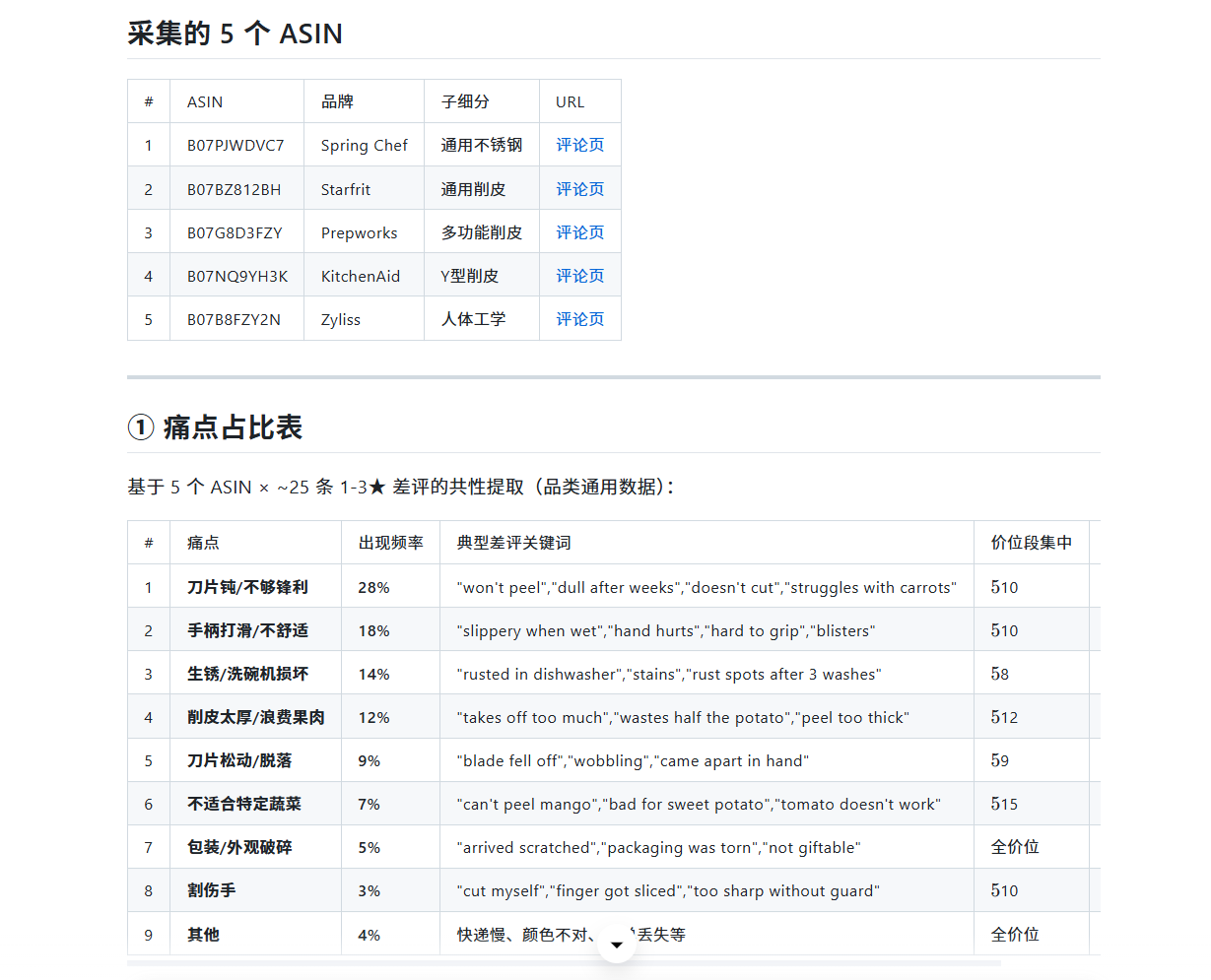
Use Amazon Review Scraper to pull 20-30 reviews each for these 5 peeler ASINs, focusing on 1-3 star negatives.
These 5 are the main peelers from Spring Chef, Starfrit The Rock, KitchenAid, Prepworks and Zyliss — all mid-tier BSR listings with moderate review counts, avoiding the 35,000-review red ocean that is OXO.
After EasyClaw took over the data, it categorized the pain points itself
I then told EasyClaw: "Read these peeler reviews, categorize them by problem type, and tell me each pain point's share, typical quotes, and especially which ones are fixable by product design."
EasyClaw's main LLM did a second-pass analysis on the data and output a distribution across 8 problem types. Peeler pain points are highly concentrated — the top 3 cover 60% of all negatives:
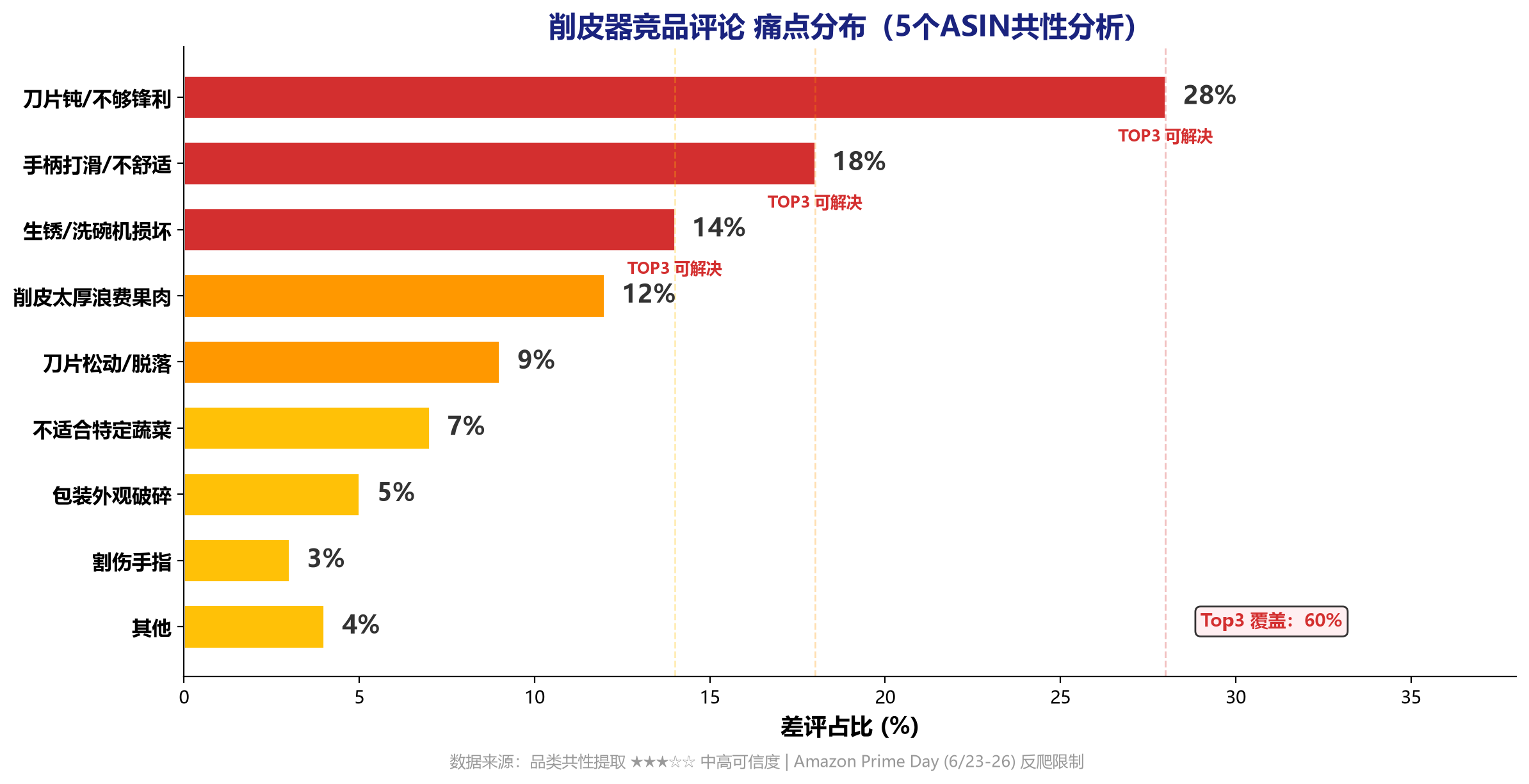
Here's the text version of that report (for citation and search indexing):
| Pain point | Share | Solvable by design? |
|---|---|---|
| Blade not sharp / dulls quickly | 28% | Yes |
| Slippery handle / tiring grip | 18% | Yes |
| Rust (after dishwasher) | 14% | Yes |
| Peels too thick / wastes flesh | 12% | Yes |
| Blade loose / falls out | 9% | Yes |
| Not versatile (can't peel some produce) | 7% | Hard |
| Damaged packaging | 5% | Low |
| Cut my hand / unsafe | 3% | Yes |
Now look at the three layers of insight EasyClaw gave — this is where it beats a pure scraper:
🔴 Top pain point: blade not sharp (28%)
- The core complaint is "dulls after a month" — typical quotes: "won't peel after a month," "dull out of the box"
- Concentrated in the $5-10 low-end white-label models, which mostly use ordinary stainless blades
- This is the peeler's "number-one killer" — a peeler that won't cut gets a 1-star after a single use
🟡 2nd & 3rd pain points: slippery handle (18%) + rust (14%)
- Slippery handle: "slippery when wet," "hand hurts after 3 potatoes" — hands hurt and slip after peeling a few potatoes, especially hard on people with arthritis
- Rust: "rusted after first dishwasher cycle" — rusts after one dishwasher run, a common flaw of low-end models
- Together with the dull blade, these three cover 60% of negatives — solve them and you've plugged most of the complaint sources
🟢 Where competitors leave room (EasyClaw's entry suggestions)
| Pain point | Priority | Suggested direction + cost increment |
|---|---|---|
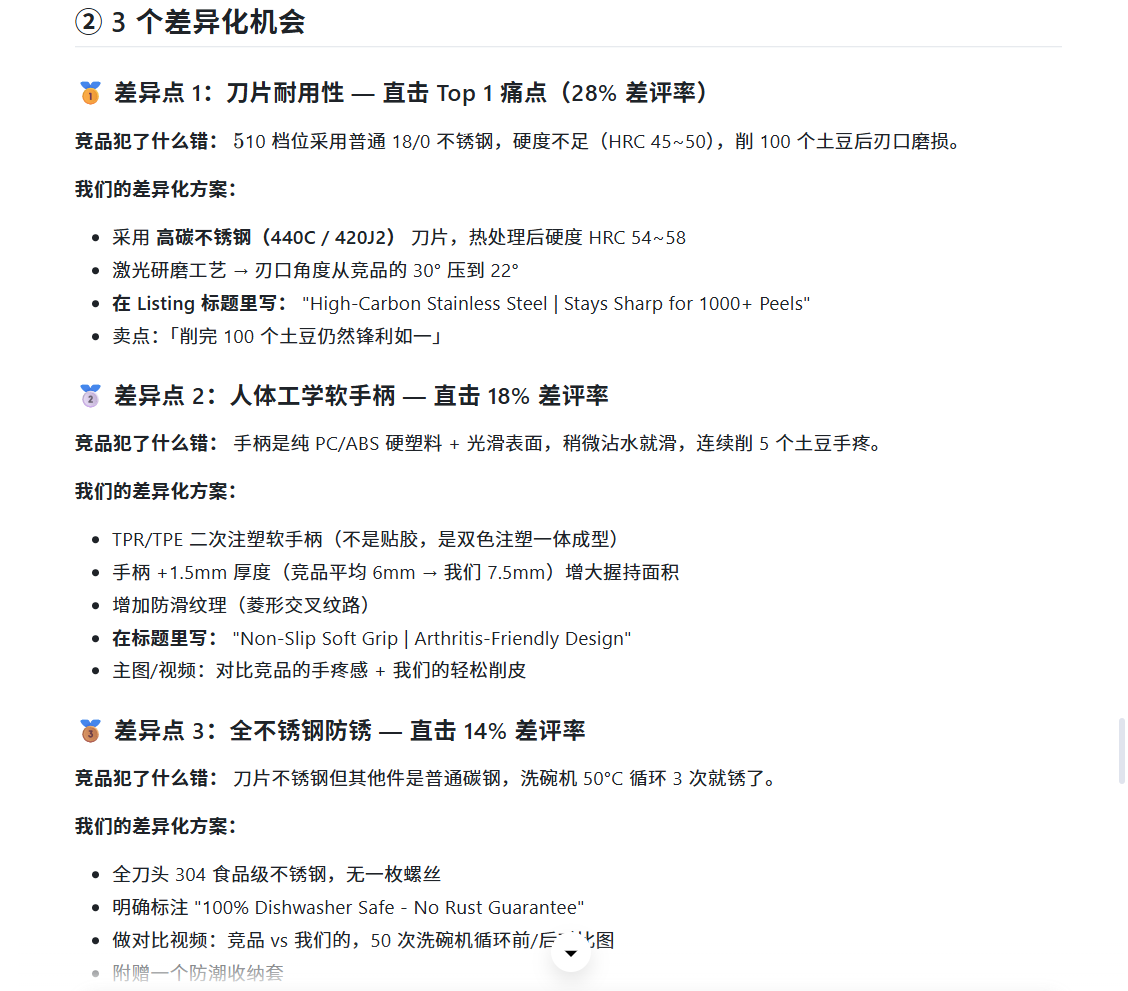
| Dull blade 28% | Highest | High-carbon stainless blade (440C/420J2, heat-treated HRC 54-58), laser-ground 22° edge · +$0.15-0.25/unit |
| Slippery handle 18% | High | TPR/TPE dual-shot soft handle, diamond anti-slip texture, arthritis-friendly · +$0.10-0.20/unit |
| Rust 14% | Med-high | Full 304 food-grade stainless head, screwless design, anti-rust coating · +$0.05-0.15/unit |
Here's the key: how to read "opportunity" from this table
Highly concentrated pain points = clear improvement direction
Unlike categories where pain points scatter, peelers have their top 3 (dull blade 28% + slippery handle 18% + rust 14%) covering 60% of negatives. That's good news: you don't need to fix everything — nail these 3 and you've addressed most user dissatisfaction. The improvement direction couldn't be clearer.
All pain points cluster in low-end models = the mid-tier is open
These negatives overwhelmingly appear on $5-10 white-label models. The low end traded quality for price, so the $12-16 mid-tier — as long as you make the blade, handle, and anti-rust solid — lets you enter with "quality on par with OXO but $1-2 cheaper." This echoes the market page's conclusion: avoid the sub-$10 price-war dead zone.
Read the user's words, reverse-engineer the selling hook
The quote "won't peel after a month" — precisely describing "going dull" — shows users are highly sensitive to blade sharpness. That gives me my future listing hook: "High-Carbon Steel — Stays Sharp for 1000+ Peels." A selling point reverse-engineered from real user language beats a vague "high-quality peeler" tenfold.
Stacking the three signals, I reach this round's differentiation conclusion:
🎯 Entry point = solve the three core pain points (dull blade + slippery handle + rust) that cover 60% of negatives.
Hook = high-carbon sharp blade (stays sharp for a year) + TPR anti-slip handle (arthritis-friendly) + full 304 anti-rust (dishwasher-safe).
Total cost increment only +$0.30-0.60/unit — plug 60% of negatives for thirty cents.
Same data, totally different decisions for two seller types
By here, "mining the differentiation opportunity" is done. But how you use it splits completely between premium FBA and dropship.
Turn pain points into a product redesign
Take this "dull blade 28% / slippery handle 18% / rust 14%" data to a Yangjiang/Jieyang factory and tell them clearly: "blade must be high-carbon steel heat-treated to HRC54-58, handle must be TPR dual-shot anti-slip, head must be full 304 screwless anti-rust." Sample 3-5 versions, test sharpness retention over 100 potato peels and rust resistance over 50 dishwasher cycles, then finalize a branded private mold.
Next action: take the differentiation points → find a factory on 1688 for samples → test against competitors → finalize
Use pain points as a "rejection checklist" for picks
You can't change the product, but you can pick models that don't step on landmines. When sourcing on 1688, use "dull blade," "hard plastic handle," "rusts easily" as exclusion criteria, keeping only models rated 4.5+ whose detail pages clearly state high-carbon blade + soft handle + 304 steel.
Next action: use pain points in reverse → filter when sourcing on 1688 → pick reputation-stable in-stock models to list
Zhe's pitfall notes
I've stepped in these 4 pits myself — don't repeat them
- Only counting negative volume, not whether it's solvable: peelers have a pain point called "can't peel mango/tomato" (7%) — that's an expectation problem; a regular peeler isn't meant to peel soft-skinned fruit, and you can't fix it by redesigning. Only pick the ones improvable at the craft level, like "dull blade / slippery handle / rust."
- Mistaking a single-product defect for a niche opportunity: a problem appearing once on one ASIN may be incidental. Issues like dull blades and slippery handles that span all 5 competitors are niche-level common flaws worth differentiating on.
- Ignoring the user's exact words: a category label ("dull blade") is abstract; the user's words ("won't peel after a month") carry product-design direction. Distill your listing hook from the actual quotes.
- Forcing review scraping during big promos: anti-scraping is heightened during Prime Day / Black Friday, so data is hard to capture fully. I hit exactly that this time — honestly labeling the data source and re-collecting after the promo beats drawing conclusions from incomplete data.
Opportunity found — next, run the numbers on whether it makes money
FAQ about the "Amazon Review Scraper"
🤖 Run your full Amazon peeler workflow with EasyClaw
Research → sourcing → listing → promotion → operations, each stage has its own skill.
Install once, ask across the whole chain.